

AI writing tools have gained massive popularity in the last few years. Platforms like Rytr now serve over 6.5 million users, while Grammarly’s active daily users have reached an impressive 30 million. The debate around AI-assisted writing remains contentious despite these numbers.
ChatGPT’s public launch on November 30, 2022 sparked my curiosity to explore the hype. The AI writing assistant market seemed overwhelming, so I decided to test a free AI writing tool for 30 days. My goal was to find whether a free AI writing tool could help with everyday writing tasks, even though many paid options existed.
My month-long experiment tested this tool’s limits through blog posts, emails, and creative writing projects. The results revealed surprising capabilities and limitations. This real-life test shows the unfiltered truth about AI-dependent writing for anyone wondering what these best AI writing tools can and cannot do.
Table of Contents
Why I Chose This Free AI Writing Tool
My search for the right AI writing tool wasn’t as simple as picking the first free option I found. After looking into many options, I needed to set up clear guidelines, have realistic expectations, and figure out if a free tool could do what I needed.
Tool selection criteria
The perfect AI writing tool needed specific must-have features. After perusing several leading platforms, here’s what mattered most:
User-friendly interface – The tool had to be easy-to-use so I wouldn’t waste time learning how to use it
Support for multiple text types – I needed something versatile to handle everything from emails to blog posts
Customization options – Knowing how to adjust tone and style was non-negotiable
Content quality – The output had to be coherent with minimal editing needed
Integration capabilities – The tool needed to work in my usual writing environment, not force me into something new
I also thought over practical things like word limits, processing speed, and template availability. Free AI tools come with templates for different content types—from email responses to social media posts—which makes them quite versatile even without cost.
Original expectations and goals
I set clear objectives before starting my 30-day experiment. My main goal was to see if a free AI writing assistant could help boost my productivity without sacrificing quality.
Here’s what I wanted to achieve:
Less time spent on routine writing tasks
Breaking through writer’s block on tough projects
Testing AI’s consistency across different content types
Checking if the quality worked for client-facing content
On top of that, I wanted to see how well these tools could adapt to my writing style over time. User testimonials show that AI writing assistants are a great way to get more done—one platform claims to have saved users over 25 million hours in content writing.
Why I picked a free AI writing tool over paid options
Real-world factors drove my decision to test free options instead of jumping into paid tools right away. Free AI writing tools give you a great chance to see how these technologies fit your workflow before spending money.
Free tools pack surprisingly good features. To cite an instance, some free AI writing assistants offer simple grammar checking, basic content generation, and essential templates—enough to see if the technology works for you. This try-first approach makes sense, especially since paid subscriptions cost between $7.50 and $30+ monthly.
The value you get depends on how you plan to use the tool. Some writers can create equally good content without paying for premium features. My colleague uses AI just for occasional brainstorming and quick research, so free tools work perfectly for her needs.
Notwithstanding that, I knew about the possible drawbacks. Free versions usually have word count limits (some as low as 10,000 characters monthly), fewer templates, and basic customization options. This balance between cost and features became my key question: would these limits affect my productivity, or could a free tool give me enough value?
This 30-day test ended up answering a practical question: when does it make sense for a regular writer to invest in a paid AI writing assistant?
✨ Create Social Media Posts & SEO Blog Articles with AI
Runnwrite AI is your all-in-one content creation platform. Generate engaging social media posts for Instagram, LinkedIn, Facebook, TikTok & YouTube PLUS SEO-optimized blog articles in seconds.
Getting Started: Setup and First Impressions
I finally took the plunge and downloaded a free AI writing tool. My research lasted weeks, and now it was time to see if this technology could really improve my writing process.
Installation and onboarding process
The tool setup was surprisingly simple. Unlike other complex software that needs multiple steps, this AI writing assistant was easy to configure. A smooth tutorial walked me through all the key features. This hands-on introduction showed me what the tool could do without information overload.
The browser extension option really caught my attention. While optional, it turned out to be a game-changer. The extension let me use the AI assistant on any webpage. Every text box on the internet became an AI-powered writing space.
Before starting my experiment, I had to share my writing priorities. This took some time, but it made the tool work better. The more details I gave upfront, the better results I got.
User interface and ease of use
The interface blew me away at first glance. The clean, easy-to-use design had a simple chat box to talk with the AI. I started using it right away because everything was so straightforward.
The basic functions were easy to find, but I had to dig around for some advanced features in hidden menus. The main screen had three key elements:
A chat interface to enter prompts
Response windows showing AI-generated content
Simple formatting options to edit text
The design focused on getting things done rather than customization. Yes, it is true that personalization options were limited. Most users, including me, found the chat functions were enough for everyday writing tasks.
First 3 days of testing
My first three days with the AI writing tool mixed excitement with learning curves. Day one focused on testing basic content generation for short writing tasks. The tool created decent first drafts that needed human editing.
The second day, I tried out the tool’s templates. These were great for structuring different types of content. The pre-designed frameworks helped me start writing emails and short blog posts faster.
Day three brought my first real challenge. The AI sometimes got facts wrong when writing about specialized topics. This showed me how important fact-checking was, something I hadn’t really thought about before.
These first few days helped me develop a workflow that combined AI help with human editing. The tool was great at creating rough drafts and beating writer’s block, but I needed to step in for accuracy and style consistency.
Some things didn’t work perfectly. The automated functions sometimes missed technical terms. Still, each limitation came with unexpected benefits, like getting suggestions for clearer ways to say things.
The free AI writing tool proved its worth, even with clear limits to what it could do. The simple setup and user-friendly interface made learning easy. I spent more time testing what it could do rather than figuring out how to use it.
Core Features I Explored During the 30 Days
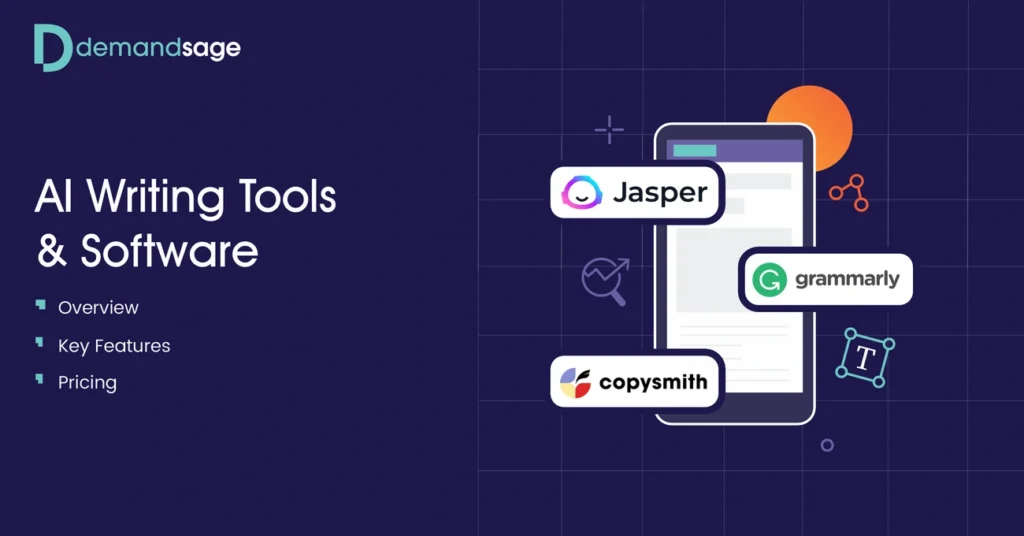
Image Source: DemandSage
My 30-day experiment with an AI writing tool revealed capabilities that went far beyond simple text generation. The tool showed remarkable versatility through four key features that became essential to my daily writing routine.
Content generation capabilities
The basics came naturally, and soon I started to challenge the tool’s content creation limits. This AI assistant could produce everything from complete drafts to well-laid-out outlines with minimal prompts. My tests covered:
Blog posts and articles with proper section headings
Marketing copy and product descriptions
Email templates and professional communications
Creative writing pieces, including short stories
The tool’s ability to spark ideas and break through writer’s block impressed me the most. Whenever I hit a wall, it suggested fresh topics and creative angles that got me moving again. The content expansion feature proved just as valuable—I could turn simple bullet points into rich, detailed paragraphs.
Editing and rewriting tools
Testing the editing features showed me both what worked and what didn’t. The rewriting tools did a great job rephrasing content while keeping the original message intact. This made it easy to create different versions of the same text that didn’t sound repetitive.
The sentence structure improvements really stood out. The system analyzed writing clarity and suggested ways to simplify complex sentences and cut redundant parts. The paragraph rewriter turned the tedious task of rewording entire sections into a quick process.
The tool wasn’t perfect though. While it helped improve writing mechanics, it sometimes got confused by technical terms. These situations needed human intervention to maintain accuracy.
Tone and style customization
The sort of thing I love was the tone adjustment feature. The tool switched between formal and casual tones with surprising accuracy. This came in handy when writing for different audiences—I could keep things professional in business emails yet sound conversational in blog posts.
The AI got better at matching my writing style over time. Its suggestions became more relevant, which helped keep my content consistent. The brand voice feature made sure my unique writing personality stayed intact even in newly generated content.
Plagiarism and grammar checks
The last major feature I tested was the content originality checker. The plagiarism detection system checked my text against billions of web pages and academic databases thoroughly. It flagged matching sentences and provided source links when it found duplicates.
Grammar checking did much more than catch spelling errors. The system spotted punctuation issues, confused homophones, and suggested stronger word choices. The tool explained its grammar corrections instead of just making changes, which helped improve my writing skills.
An unexpected bonus was the tool’s ability to detect AI-generated content. This feature could help users be transparent about using AI assistance, especially given today’s concerns about academic integrity.
These four core features proved genuinely useful for everyday writing tasks during my month-long test. They did have limitations though, and still needed human oversight and good editorial judgment.
Real-World Use Cases I Tested
My hands-on testing of this free AI writing tool revealed much more than what its feature list promised. After getting comfortable with the simple functions, I tested the tool on four key writing tasks that content creators deal with every day.
Blog post creation
A few weeks of testing showed that blog post creation was one of the best uses for my free AI writing assistant. I just had to give it a topic, target audience, and word count. The tool would then create a complete first draft in minutes that needed very little editing.
The AI writing tool was great at making structured outlines with logical section headings. This saved me lots of time compared to my usual brainstorming. Research shows a typical blog post takes 3 hours and 48 minutes to write by hand, but with AI help, I wrote several quality posts in under an hour.
Note that AI-assisted blogging still needs your own ideas and insights to create good content. My best results came from speaking my thoughts naturally and letting the AI organize them into a clear structure. This way, I kept my unique view while avoiding the hassle of organizing content from scratch.
Email and ad copywriting
The AI writing tool showed its worth in email writing and advertising copy too. During my test period, I used it to write promotional emails, newsletter content, and various ads.
The tool was fluent in creating multiple ad versions quickly. This let me A/B test different approaches without spending hours on rewrites. The AI wrote concise, benefit-focused ad copy that kept a consistent brand voice on all platforms.
For emails, the tool helped me fix one of my biggest challenges—writing briefly. I would write a long first message and ask the AI to make it shorter while keeping the main points. This feature, plus the ability to change how formal the writing was, made it perfect for professional messages.
SEO content and keyword integration
Since 67% of businesses already use AI for content marketing and SEO, I wanted to assess this feature carefully. The tool was great at adding target keywords naturally without stuffing them—key for both readability and search rankings.
I tested by giving it primary and secondary keywords and asking for content that used them naturally. The results impressed me: the AI spread keywords evenly while keeping the text smooth and natural. Combined with its suggestions for related terms, this made it valuable for creating search-optimized content.
This meant I could spend more time developing unique insights instead of worrying about keyword placement. The tool was also good at adding frequently asked questions—a smart SEO technique that helps content show up better in searches.
Creative writing and storytelling
My last test case was maybe even the toughest: creative writing and storytelling. While AI works well with structured formats, narrative writing needs emotional intelligence and real experience that machines just don’t have.
The tool did okay with plot outlines and character descriptions at first. It could offer creative ideas when I got stuck and turn bullet points into full scenes. But it couldn’t capture the emotional depth and authentic voice that make stories compelling.
On the bright side, the AI writing assistant helped beat writer’s block by suggesting possible plot turns and dialog. It worked great as a brainstorming partner rather than trying to replace human creativity, and it made coming up with ideas much faster.
For creative work, the tool worked best as an idea generator and first-draft helper instead of a complete solution. As one expert put it, “AI is amazing for idea generation and overcoming writer’s block, but it doesn’t capture the complexity of human emotions or the subtleties of character development”.
My month of testing showed both the impressive abilities and clear limits of free AI writing technology through real-life applications. Now I know exactly where these tools fit in a productive writing workflow.
🚀 Save 10 Hours Per Week on Content Creation
Stop wasting time on manual content creation. Runnwrite AI generates perfect social media posts AND SEO blog articles automatically.
Performance and Output Quality Over Time

Image Source: www.waveon.io
My 30-day experiment involved careful tracking of how the free AI writing tool’s performance changed over time. The results showed fascinating patterns in output quality and gave me valuable insights about getting the best results with AI writing assistance.
Week-by-week content quality changes
The outputs were quite generic in the first week. The AI mostly used common words and phrases as it learned my priorities. The second week brought subtle improvements to sentence structure and word choices, though some words kept showing up repeatedly in the generated content.
A major breakthrough came in the third week. The tool started producing more refined outputs that matched my writing style better after I used it consistently. Research backs this up – AI writing tools become more effective in your workflow the more you use them.
The tool’s vocabulary grew beyond standard phrases in the final week. Some AI writing patterns were still easy to spot though. Words like “meticulous,” “explore deeply,” and “realm” showed up 35-51% more frequently than in typical human writing. This verbal fingerprint became clearer the more I used the tool.
Consistency and reliability
The AI writing tool showed impressive consistency for similar writing tasks. Quality stayed stable with minimal changes after generating multiple blog posts on related topics. This made it especially useful for routine writing tasks that followed familiar patterns.
Factual accuracy remained challenging. Even in the final days of testing, I still found occasional “sensical nonsense”—content that sounded authoritative but had inaccuracies. This highlighted why fact-checking all AI-generated content is crucial, whatever the content might sound like.
The tool became much better at maintaining brand voice. After getting consistent feedback, it became fluent in keeping my writing style across different content types by week three. This matches research showing that AI writing tools can learn to maintain consistent tone and branding.
Handling of complex prompts
I gradually tested the tool’s limits by increasing prompt complexity throughout my experiment. Simple prompts worked best at first, while complex, multi-part requests often resulted in incomplete or unfocused responses.
Breaking down complex requests into smaller, more focused prompts improved output quality dramatically. Research confirms this – a step-by-step approach becomes necessary when prompt complexity reaches about 100-120% of what the AI can handle effectively.
Prompt structure played a big role in output quality. Clear, specific instructions produced better results than vague requests. The AI writing tool delivered more relevant content when I made my expectations clear about format and depth of response.
My 30-day experiment’s most valuable lesson was that good AI writing depends as much on developing prompt engineering skills as the tool itself. The quality gap between my early attempts and later, more strategic prompts was so big that the same free tool felt like a completely different product.
What Worked Well (Pros)
My 30-day experiment with this free AI writing tool revealed some amazing benefits that left me impressed. I pushed the tool to its limits and discovered three key advantages that stood out.
Speed and efficiency
The first thing that caught my attention was how much faster I could write. Regular content creation usually takes hours of focused work, but this AI writing tool helped me create complete first drafts in minutes. The numbers back this up too – research shows AI-powered writing can reduce content creation time by up to 70%.
This tool is a great way to get help with time-sensitive projects. It handled repetitive writing tasks well and let me concentrate on content strategy. Studies show businesses have saved over 25 million hours in content creation by using AI writing tools.
The benefits went beyond just first drafts. The tool helped organize thoughts into clear structures and simplified the writing process. I ended up creating twice as much content in the same time frame.
Ease of use for beginners
Most complex tools need time to learn, but this AI writing assistant had an accessible interface from day one. The clean design made navigation easy without losing any features.
The tool felt natural to use rather than being a hurdle. Within a week, I developed simple processes that blended with my existing habits. You don’t need technical knowledge to get value from the system – the learning curve barely existed.
This makes free AI writing tools perfect for writers who might shy away from new technology. I could create useful content quickly while learning advanced features at my own pace.
Useful templates and tone options
The tool’s extensive template library and tone settings were game-changers. It offered pre-designed frameworks for virtually every writing scenario – from emails to blog outlines and social media posts.
The tone adjustment features were sophisticated. One click switched content between casual and formal styles while keeping the main message intact. This meant I could adapt content for different platforms without starting over.
The tool also showed it could learn my writing style and mirror it in new content. After using it for a few weeks, the outputs started to include subtle elements of my voice. This preserved my authentic expression while saving time.
These three advantages – speed, accessibility, and customization – are the foundations of what made this free AI writing tool valuable during my month-long experiment.
What Fell Short (Cons)
Image Source: Watermark Agency
My month-long test revealed several drawbacks that dampened my initial excitement about this free AI writing tool. These challenges deserve careful thought from anyone planning to use it.
Limitations of the free plan
The free version’s restricted access to specialized documents and recent information became immediately apparent. Users have nowhere near the access they need to retrieve specialized content. Time-sensitive topics proved especially challenging because many free AI models have information cutoffs. Some models only contain data up to January 2022.
Word count restrictions in the free version disrupted my writing flow just as ideas started flowing. This made me selective about my writing tasks and limited the tool’s usefulness for longer projects.
Occasional factual inaccuracies
The tool’s tendency to generate “hallucinations” – seemingly plausible but completely made-up information – emerged as the most worrying issue. My testing showed:
Incorrect factual statements, numbers, and dates (a newer study, published in showed this happened in 19% of AI answers)
Altered quotes from cited sources or nonexistent references
Wrong information presented with complete confidence
Modern AI models still produce false information at a baseline rate. This meant I needed a full picture of everything the tool created. The fact-checking often took longer than writing the content myself.
Lack of advanced formatting or integrations
Extended use exposed the technical limitations clearly. Many AI tools’ complex interface created a steep learning curve. The tool sometimes accessed my source code even with “Codebase off” settings, which raised privacy concerns.
The integration capabilities disappointed me. The AI assistant struggled with formatting, especially when you have technical content with specialized terminology. The lack of continuous connection with my existing workflow forced me to copy-paste between platforms, which reduced efficiency.
These limitations meant the tool worked best for quick drafts and generating ideas. However, it needed substantial human input to create polished, accurate content.
How It Compares to Other AI Writing Tools
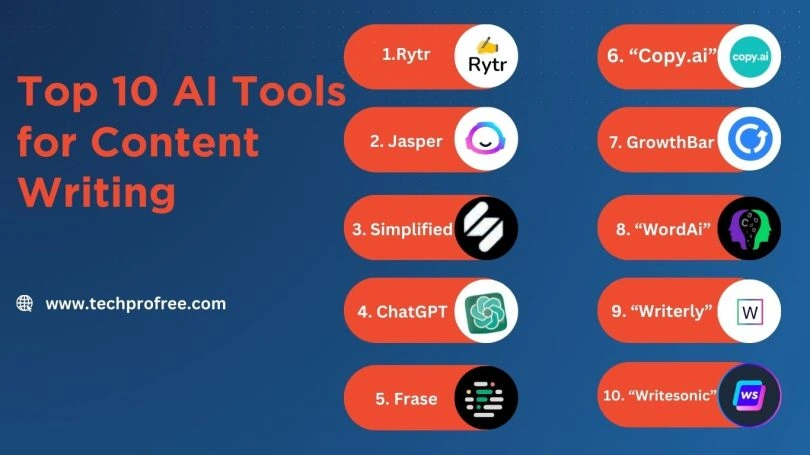
Image Source: Techprofree
AI writing assistants compete fiercely in today’s market. Users need to know how these tools compare with each other.
Comparison with Jasper, Rytr, and CopyAI
My free tool stacks up well against premium alternatives. Jasper runs on GPT-4 with custom tuning. It costs $49/month and works great for long-form blogs and SEO content. CopyAI shines with short-form marketing content. The platform has a modern look with 90+ templates that work best for email drafts and social posts. Rytr keeps things simple. It supports over 30 languages and gives beginners an easy start at $9/month.
Where it stands in terms of value
Free AI writing tools have come a long way by 2025. My free tool matches what premium options offered two years ago. Premium features still matter though. Jasper’s Brand Voice and CopyAI’s unlimited word generation help serious content creators get better results.
Best use cases for this tool vs others
This free AI assistant works great for quick content creation and idea generation. Each tool has its sweet spot. Jasper excels at detailed content marketing. CopyAI creates quick marketing copy fast. Rytr serves budget-conscious users who need multiple languages. Tests showed that 60% of tasks had similar quality across both free and paid options.
Conclusion
My 30-day trial of this free AI writing tool left me with mixed feelings, though mostly good ones. The tool saved me tons of time on different writing tasks. Blog posts and email copy that usually took 3-4 hours were done in under an hour. Speed was definitely its strongest point.
Without doubt, the AI-generated content got better as the system learned my priorities. The generic text it started with slowly changed to match my voice better, though you could still spot some AI patterns throughout my experiment. The tool became more useful as it adapted to my style over the month.
The sort of thing I love was how easy it was to use. Even with my basic tech knowledge, I found ways to blend it with my usual writing routine. A huge template library and options to customize the tone made it even better, and I could easily reuse content on different platforms.
All the same, some big problems showed up during testing. Facts weren’t always right, and I had to check everything carefully – which sometimes canceled out the time saved. The free version also had limits on word count and outdated information, making it less useful for bigger, current projects.
Should you try this free AI writing tool? It really depends on what you need. These tools are a great way to get started with occasional content, brainstorming, and breaking through writer’s block. But serious content creators might want to invest in paid versions, especially for specialized or high-volume work.
My month with this tool showed that AI writing assistants work best as partners rather than replacements. They’re great at first drafts, suggesting changes, and handling routine writing – but you still need human oversight to keep things accurate, authentic, and emotionally connected. Finding the right balance between AI efficiency and human judgment seems to be the key to getting more done without losing quality.


