
A recent study shows 49% of B2B marketers now use generative AI to create emails. This means almost half of all business marketers trust AI with their daily email tasks.
The numbers tell an interesting story – 75% of professionals want to use AI for content writing, email creation, and task automation. AI tools have proven their worth, as 52% of marketers report simplified processes and faster output in their work.
Busy professionals struggle with overflowing inboxes daily. An AI email generator offers a solution by helping you draft, edit, and automate responses quickly. These tools can substantially cut down your message composition time, whether you choose a free AI email generator or opt for a premium AI email assistant.
This step-by-step guide will show you how to pick and set up the perfect AI email generator that matches your needs. You’ll learn to work with these tools effectively and boost your email productivity. AI email tools do more than save time – they give you valuable insights about your email content and interactions.
Your workweek hours are precious. Let’s head over to the world of AI-powered email writing and make them count.
Table of Contents
What is an AI Email Generator?
An AI email generator works as a smart digital assistant that turns brief instructions into complete, ready-to-send emails. These smart tools use natural language processing (NLP) and machine learning algorithms to analyze text data. They understand common patterns and structures in email communication. You can input simple prompts like “Follow up on yesterday’s proposal, friendly tone, 3 bullets, CTA to schedule,” and the system creates a polished draft that matches your needs.
These tools work like prediction machines and process your input through three main parts:
Prompts: Your specific instructions and goals for the email
Context: Relevant information the model can access, such as previous email threads or CRM data
System guardrails: Rules the provider enforces, including privacy controls and style guides
The process is straightforward. You visit the website or open the application, enter your prompt or purpose, click a button to generate content, and review the result before using it. Complex technology works behind the scenes to understand what you want and produce natural-sounding content that fits your needs.
How it is different from traditional email tools
Traditional email tools mainly focus on organization—they handle scheduling, reminders, or categorize your inbox. AI email generators focus on creating the actual content of your messages. This makes them quite different from standard email assistants.
Standard smart replies offer one-line suggestions like “Sounds good!” or “Let’s schedule a time.” But detailed AI email generators can create multi-paragraph responses, outreach emails, follow-ups, or entire sequences that match your specific needs. They do more than manage your inbox—they help you write better emails faster.
These tools also excel at personalization. Traditional tools might allow simple template variables like {{First_Name}}. AI email generators analyze recipient data to customize content based on previous interactions, interests, and behavior patterns. This creates more engaging and relevant messages.
AI email generators also get better over time. Traditional email tools stay the same unless someone updates them manually. AI systems learn from patterns and feedback, and they match your communication style more closely as you use them.
Common use cases for professionals
Professionals in any discipline find AI email generators useful for many communication tasks:
Business Communications: These tools help draft client outreach emails, internal updates, project follow-ups, and executive summaries—they save time while keeping things professional.
Content Creation and Editing: AI helps with:
Drafting new emails from simple prompts for almost any use case
Tone adjustments to make formal language more approachable
Length modifications to shorten 300-word messages to 120 words while keeping the meaning
Jargon simplification by using clearer explanations for technical terms
Thread Management: Many professionals use AI to summarize long email chains. It pulls out key points, open questions, and deadlines from long conversations. The technology turns messy exchanges into useful information.
Marketing Campaigns: Email marketers use these tools to generate compelling copy, catchy subject lines, and optimized calls to action. Brands using AI-driven personalization have seen up to 41% higher click-through rates.
Sales and Customer Support: Sales teams create personalized outreach, follow-ups, and responses at scale. Support teams use them for consistent, helpful replies to customer questions.
Personalized Communication: AI can customize entire messages based on recipient data, previous interactions, and behavior patterns—creating truly personal communication.
These versatile tools have become essential for busy professionals who want to improve productivity without losing quality. Recent research shows that professionals using AI-generated business messages found them to be effective, confident, and direct—key aspects of good workplace writing.
✨ Create Social Media Posts & SEO Blog Articles with AI
Runnwrite AI is your all-in-one content creation platform. Generate engaging social media posts for Instagram, LinkedIn, Facebook, TikTok & YouTube PLUS SEO-optimized blog articles in seconds.
Benefits of Using AI for Email Writing
AI email tools do more than just generate text. They give you real productivity gains if you have a busy schedule. The benefits go way beyond the reach and influence of simple convenience and improve your daily workflow and communication quality.
Saves time and reduces mental load
Email management takes up a huge chunk of our workday. Studies reveal that employees typically spend nearly 28% of their workweek—approximately 13 hours—managing emails. The situation looks worse as professionals spend an average of 11 minutes to write a single email.
AI email generators ease this burden by a lot. These tools can cut email composition time by up to 75%, which turns an 11-minute task into something that takes just 2-3 minutes. If you have to send 25 emails daily, you can save roughly 3.5 hours every week.
The time savings grow impressively with team size. A McKinsey study found that generative AI cut email time by about 25%, which saves nearly 3 hours per week for each knowledge worker. Companies that use AI email automation have seen their productivity jump by 25% by cutting out unnecessary back-and-forth messages.
AI email tools also ease the mental strain of inbox management. Each email needs dozens of quick decisions about tone, content, and phrasing. These decisions pile up throughout the day and cause decision fatigue. AI email assistants handle these mental tasks and free up your energy to focus on work that needs human judgment and creativity.
Improves tone and clarity
Professional communication needs to stay consistent. AI email generators excel at keeping the right tone in all messages, whatever you’re writing to clients, team members, or executives.
These tools improve clarity by breaking down complex ideas into digestible points. They make text more readable through better sentence variation and create stronger calls-to-action. Studies show companies using AI-powered email assistants had 30% fewer miscommunication problems, which led to better interactions and stronger client relationships.
AI does more than fix grammar and eliminate errors – it makes your emails direct and purposeful. Research shows business professionals using AI produced documents rated much higher in quality—4.5 versus 3.8 on a 7-point scale. This happens because professionals spend less time on their original drafts and more time making them better.
Helps overcome writer’s block
Starting emails often feels like the hardest part. AI email generators are a great way to get past that first draft and beat the “blank page” problem. They spark ideas, organize content, and suggest different ways to say things.
Writer’s block hits hardest when crafting sensitive or high-stakes messages. AI assistants make this easier by showing you multiple ways to handle difficult communications. This helps a lot when you just need to respond quickly but carefully to complex situations.
AI tools work like your personal writing coaches and help you become a better communicator over time. They create learning opportunities by suggesting improvements that build on your natural writing style. Many users say AI assistance gets their “creative juices flowing” and makes “writing a lot easier”.
AI’s benefits go beyond simple automation – they reshape the scene of how we deal with email. These tools handle routine messages quickly and move email from an attention drain to a productivity boost. You can focus your unique human skills on meaningful work while keeping your professional communication top-notch.
Step 1: Choose the Right AI Email Tool
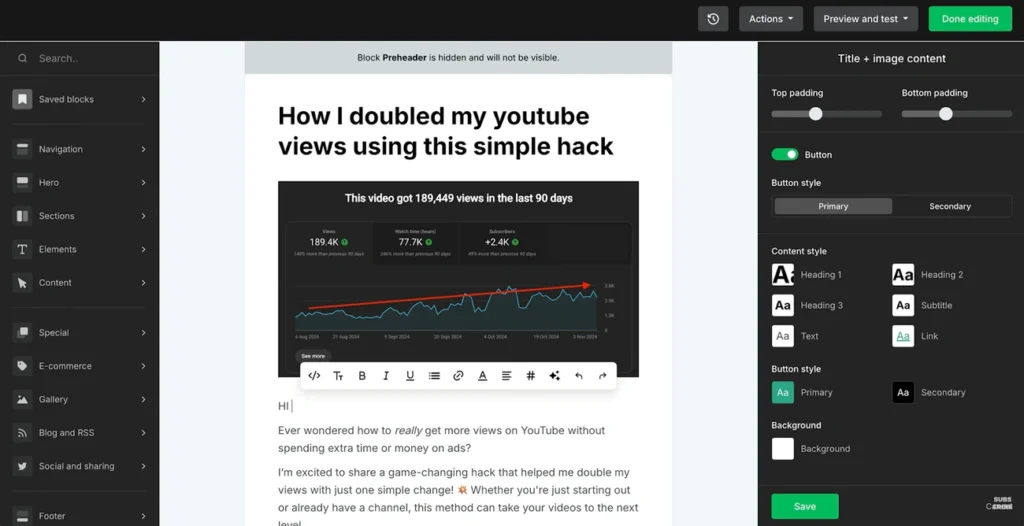
Image Source: Lindy
The right AI email generator can be the foundation of your email productivity strategy. The market has many options, and you need to understand your needs to find the perfect tool that matches your criteria.
Free vs paid options
Most good AI email tools let you try them for free or offer freemium models. You can test how well they work for your needs, check the content quality, and decide if the features are worth the cost.
Free AI email tools come with basic but useful features:
Basic AI generation features with monthly word or email limits
Simple templates for common email types
Standard grammar checking and basic tone adjustments
Paid options come in several pricing structures:
Per-user monthly subscriptions (typically USD 10-49 per user/month)
Credit-based systems where you pay per email generated
Tiered plans with increasing feature sets
Volume-based pricing tied to email send limits
Budget-conscious users might like Rytr, which starts at USD 9.00 monthly for 100,000 characters. Brevo includes its AI email builder in its free plan. In spite of that, look at the complete value rather than just the price—some tools might seem cheap at first but cost more as you use them more.
Top tools for different needs
Each professional requirement needs specific AI email tools:
For high-volume sales outreach: SmartWriter (starting at USD 49.00/month) works well with LinkedIn and CRM data to personalize cold emails. Lindy (USD 49.99/month) offers custom AI agents that handle everything from writing emails to generating leads and updating CRMs.
For general inbox management: SaneBox uses advanced machine learning to sort, prioritize, and filter emails by importance. Shortwave groups emails through AI-powered search.
For marketing teams: MailerLite (free plan available, paid plans from USD 10.00/month) includes AI writing assistants in its email marketing suite. HubSpot’s AI Email Generator creates marketing email copy in a user-friendly way.
For continuous connection: Google Gemini works well with Gmail and calendar. Microsoft Copilot in Outlook (from USD 30.00/month) makes email tasks easier in the Microsoft ecosystem.
For versatility: ChatGPT (USD 20.00/month for Plus plan) helps you draft various types of emails. Though not made just for emails, it’s flexible enough for many email tasks.
What to look for in the best AI email generator
These factors matter most when picking an AI email tool:
Your AI email generator should combine smoothly with your digital tools. This includes email platforms (Gmail, Outlook), CRM systems, marketing automation tools, and calendar apps. Poor integration wastes time moving content between systems.
The tool’s customization and personalization options matter too. It should match your brand’s voice and create messages for specific recipients. Good personalization leads to better engagement and responses.
Data privacy and security measures need attention. Each platform handles security and data differently. Gmelius shows this by using Google’s internal models and removing data once it’s not needed.
The user experience makes a big difference. If you’re not tech-savvy, look for a tool with a clean, user-friendly design and good support options. A steep learning curve can slow down your productivity gains.
Looking at these factors alongside your needs helps you find an AI email generator that makes your professional communication better, rather than just adding another tool to your collection.
Step 2: Set Up Your AI Email Assistant
You need to set up your AI email tool properly after picking the right one. This helps it match how you work and communicate. Most AI email tools have a quick setup process. You can get started in just 30 seconds with some platforms.
Creating an account and connecting your inbox
The first step is creating an account on your chosen AI email platform. Next, you’ll connect your existing email inbox. This connection lets the AI work naturally within your email environment.
Gmail and Outlook users can easily connect their accounts through direct integrations. These tools are built to be user-friendly – no technical knowledge needed. The connection process is simple:
Look for the “Connect” button on the right side of your screen
Pick your email service from the list
Follow the steps to give needed permissions
Your data stays safe during this process as good tools use protected ways to send information. To name just one example, AI Email Writer sends your instructions securely to processing engines like OpenAI that create emails while keeping your privacy safe.
Teams using tools like Missive can share AI features once connected. This gives everyone access to custom prompts and templates.
Setting preferences and tone
The next part is teaching your AI assistant how you like to communicate. This is like helping it get to know you better.
AI email tools let you customize many things:
Tone adjustments — Pick formal, casual, or other styles that line up with your brand’s voice
Message length preferences — Choose between short or detailed messages
Formatting options — Pick how you want greetings and signatures to look
Brand voice guidelines — Upload style guides or let the AI learn from your writing samples
Your existing writing samples are a great way to get better results. Many platforms analyze these to copy your unique style. You can add samples by uploading files, letting it scan your content, or copying text right into the tool.
The AI needs to know who you’re writing to. This helps it understand the context and adjust what it writes. Some advanced tools let you set up rules about which emails should get AI responses.
Business users of platforms like Klaviyo get extra options to set their brand’s voice. These include special words that define their style, detailed descriptions, and specific writing rules. These settings work automatically for all AI-written content.
The setup process should feel natural, not technical. The goal is simple – create an AI helper that knows exactly how you communicate and writes emails that sound just like you.
🚀 Save 10 Hours Per Week on Content Creation
Stop wasting time on manual content creation. Runnwrite AI generates perfect social media posts AND SEO blog articles automatically.
Step 3: Input Your Email Details
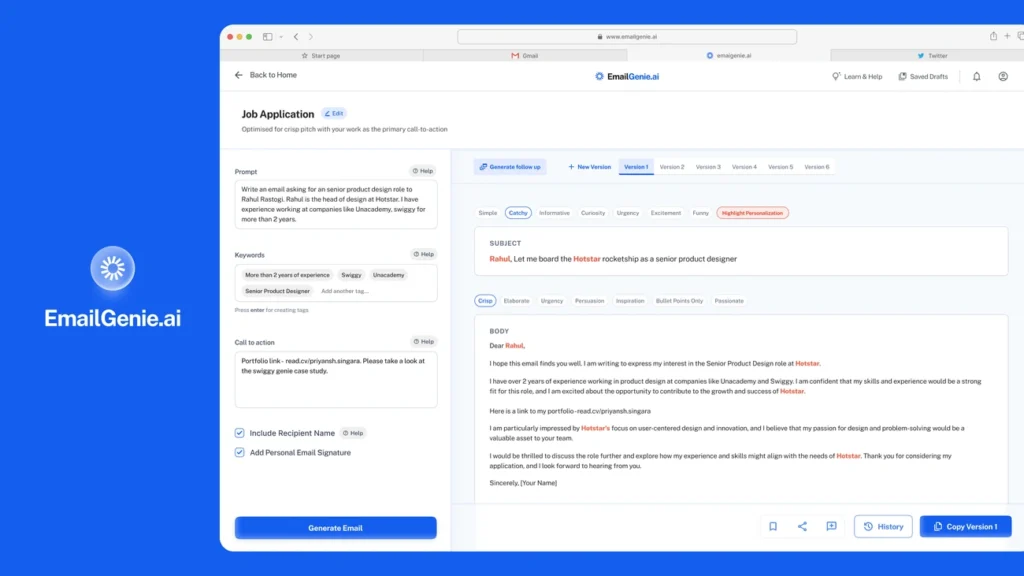
Image Source: Muzli – Design Inspiration
Your AI assistant’s email quality depends on your instructions. Just like guiding a new employee, your AI email tool needs clear directions to deliver what you want. Let me show you how to give the right input for the best results.
Writing effective prompts
The quality of your prompts makes all the difference between average and exceptional AI-generated emails. Generic prompts lead to generic results. Detailed prompts create tailored, effective communications.
These best practices will help you create effective prompts:
Give detailed context instead of vague instructions. Don’t just type “Draft an email to John.” Try “Draft a follow-up email to John regarding our meeting last Tuesday about the Henderson project timeline delays“. This specific context helps the AI really understand the situation.
Your desired tone should be clear in every prompt. Let the AI know if you want “professional but friendly” or “formal and direct” communication. AI email tools have tone presets to make this easier, but stating your preference will give a consistent result.
List everything you need in your email. This helps the AI structure your message and includes all vital information. To cite an instance, bullet point the topics, questions, or requests you want in your email.
Set boundaries when needed, like “Keep under 150 words” or “Avoid technical jargon since the recipient is non-technical”. These guidelines help the AI create content that fits your needs.
Add keyword phrases you want in the email. This works great for marketing messages or when specific terms matter.
The AI follows your lead. Vague instructions create vague results. Detailed prompts make the output much better.
Adding recipient context and goals
Your AI-generated emails need clarity about who you’re writing to and what you want to achieve.
Tell the AI your email’s purpose first. Are you reaching out to a potential client? Following up on a chat? Sending a newsletter? This basic context helps the AI create content that matches what you want.
Add specific details about your recipient when possible:
Recipient’s name and company
Their role or position
Previous interactions or purchase history
Their expressed needs or interests
When writing to a client, mention their recent purchase or question. This context helps the AI create a draft that feels customized and relevant.
Your intended outcome matters just as much. The AI needs to know what you want the recipient to do after reading your email. State your goal clearly – whether it’s booking a meeting, getting feedback, or making a sale. This guides the AI to create content with the right call to action.
Ask yourself: “What problem am I solving?” and “What specific action do I want them to take?” Your ai email generator will give substantially better results when you include these answers in your prompt. This focused approach creates communications that feel personal and purposeful.
Step 4: Generate and Edit Your Email
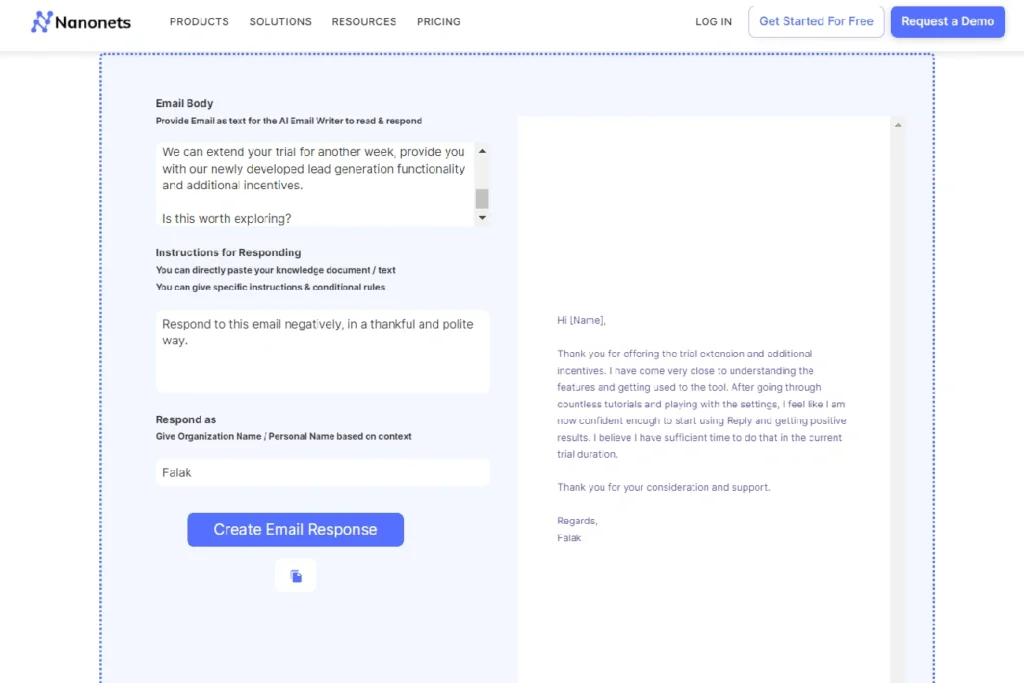
Image Source: Mailmodo
Your AI assistant changes your instructions into a fully-formed email at this significant moment. This stage blends technology and human oversight to create emails that work.
Reviewing AI-generated drafts
Your ai email generator creates a draft based on your inputs after you click “generate.” Human review plays a vital role before sending any AI-created email. Most executives spend about 75% of their time writing emails rather than making decisions that matter. You want to save time while maintaining quality.
These key checkpoints will help you review your draft:
Accuracy: Verify that all facts, figures, and recipient details are correct
Completeness: Confirm all requested points from your prompt are addressed
Flow: Check that paragraphs connect logically and the email reads naturally
Many tools provide a scoring system to help with your review. Apollo AI analyzes your emails against millions of successful exchanges and suggests a score of 90%+ to boost reply rates. Lavender also recommends a similar measure to maximize engagement.
Making manual edits for personalization
The best ai email generator creates a solid foundation, but personalization remains your job. AI drafts should be starting points rather than finished products. Executives handle over 120 emails daily, yet each needs a personal touch.
You can improve AI-generated content by adding recipient-specific references, shared experiences, or unique insights only you could provide. Specific details relevant to your reader’s relationship should replace generic phrases. Your edits will change the email from algorithmic to authentic.
Using grammar and tone suggestions
Advanced ai email tools do more than generate text—they offer refinement options. Apollo’s AI can rephrase sections based on specific instructions like “simplify” or “make shorter”. This guidance helps streamline communications while preserving meaning.
Tone adjustment features can match your communication style. Quality ai professional email generator platforms analyze your writing patterns, sentence length, vocabulary choices, and even your sign-off style. They adapt your formal or casual approach based on the recipient.
The technology should handle composition while you focus on making each message genuine. AI should boost your voice rather than replace it.
Step 5: Send, Track, and Automate
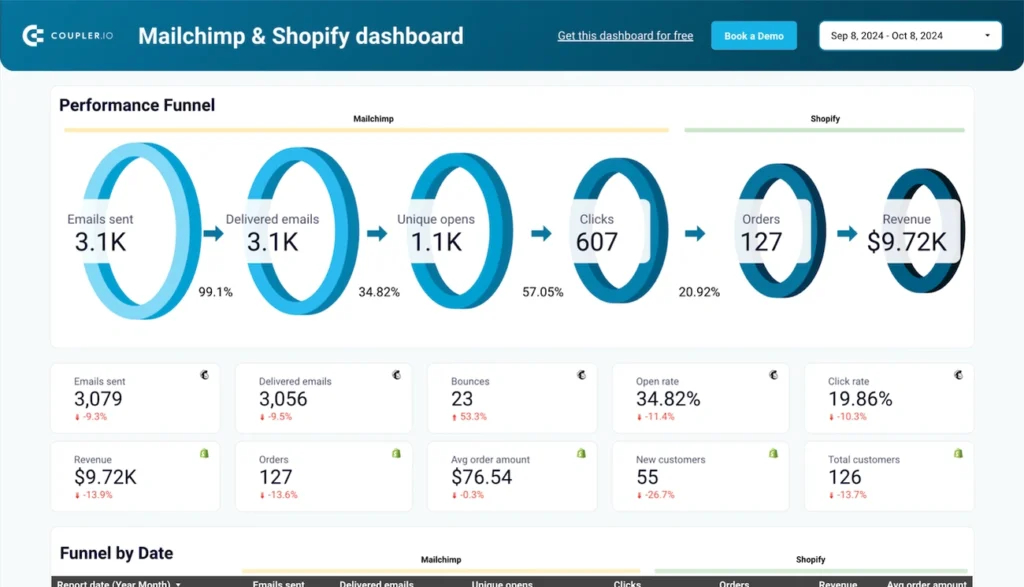
Image Source: Coupler.io
Statistics show that 80% of sales happen at the time of the 5th and 12th follow-up. Your email content needs strategic sending, systematic follow-ups, and careful performance tracking to maximize its effect.
Scheduling and sending emails
Advanced ai email tools give you a major advantage with smart scheduling. Modern ai email generators analyze how recipients behave and interact to pick the perfect delivery times, unlike simple email platforms that stick to fixed schedules.
Your message reaches recipients when they’re most likely to read it—some might check emails early morning while others prefer evening hours. The system adjusts delivery times based on local time zones, so your emails arrive appropriately whatever the recipient’s location.
Many ai email assistant platforms work with your calendar. You can check when you’re free, schedule events, and write scheduling emails all in one place. This uninterrupted connection between your email and calendar makes coordination effortless.
Using follow-up automation
Single messages don’t work as well as follow-up sequences. A well-structured sequence will boost your response rates:
Define clear objectives for each sequence (booking meetings, nurturing leads)
Set up recipient segments based on engagement levels
Create a graduated follow-up pattern:
Original outreach with value proposition
Educational content (2-3 days later)
Social proof or testimonial (5-7 days later)
Final call-to-action (10-14 days later)
Personalization matters even in automated sequences. The best ai email generator platforms let you use dynamic fields, reference previous conversations, and include content that addresses specific business challenges.
You should avoid over-automation. Mix automated emails with personal outreach, don’t flood prospects with too many messages, and keep personalization genuine even in automated sequences.
Tracking open and response rates
Ai professional email generator tools come with detailed analytics dashboards that show:
Open rates: Review subject line effectiveness and timing optimization
Click-through rates (CTR): Measure engagement with content and calls-to-action
Response rates: Monitor how many recipients actively reply
Conversion rates: Track completion of desired actions
These analytics help make decisions based on real performance data. Apple’s Mail Privacy Protection has made open rate tracking harder by hiding user activity. Marketers now focus more on click-to-open rates (CTOR) and conversion metrics as better ways to measure engagement.
Teams using CRM systems can connect their ai email generator to log replies automatically. This makes follow-up prioritization easier without manual work.
Best Practices for Using AI Email Generators
A few simple practices will help your ai email generator deliver the most value while keeping quality and authenticity intact. These strategies help you balance speed and results.
Always review before sending
Human oversight plays a vital role when using ai email tools. These systems can sometimes produce inaccurate or misleading content despite their advanced capabilities—experts call this “AI hallucination”. One marketer saw their A/B testing results improve 10x after they reviewed and refined AI-generated content. You should check your sent box occasionally to catch errors that slipped through your original reviews. This approach helps you spot mistakes before your recipients do and keeps your communications professional.
Experiment with different prompts
The quality of your prompts directly shapes how good your AI-generated emails will be. Unclear instructions will give you generic results. Your outcomes will improve when you clearly define your audience and goals. You might want to share examples of your writing style to help the ai email assistant match your voice. The output quality depends on your input—learning simple prompt engineering basics will improve your results by a lot.
Avoid over-reliance on automation
AI efficiency works best when combined with human judgment, and with good reason too. Too much automation removes important human elements from communication. You should create clear processes to handle complex issues that need personal attention. Regular checks of performance metrics like open rates and responses help track success. The best ai email generator should make you better rather than replace you. This balanced approach keeps communications authentic while leveraging technology’s benefits in professional settings.
Conclusion
AI email generators have revolutionized how busy professionals deal with daily communication challenges. This piece explores how these powerful tools can save you considerable time. The average professional who sends 25 emails daily can save up to 3.5 hours each week. These tools do more than save time – they help you overcome writer’s block, keep a consistent tone in your communications, and reduce the mental load of managing your inbox by a lot.
Your email productivity strategy needs the right tool as its foundation. You should think over your specific needs against features like integration capabilities, customization options, and security measures to find the perfect match. The quality of your prompts will determine how good your output is once you’ve set up your preferred AI email assistant. You’ll get the best results when you provide detailed instructions with clear context, tone specifications, and desired outcomes.
Note that human oversight plays a vital role. AI-generated drafts work as starting points rather than finished products. Your personal touch turns algorithmic text into authentic communication. You can streamline processes after sending through strategic scheduling, systematic follow-ups, and performance tracking.
Professional email’s future looks increasingly AI-powered. The most effective approach combines technological efficiency with human judgment. AI handles the heavy lifting while you focus on meaningful connections. So you get back hours of your workweek without losing quality or authenticity.
Start by testing different prompts and slowly add AI email generation to your workflow. You’ll soon wonder how you managed your inbox before. The sweet spot lies between automation and personalization—where technology boosts rather than replaces your unique voice.